> ## Documentation Index
> Fetch the complete documentation index at: https://docs.virtualcontrollersupply.com/llms.txt
> Use this file to discover all available pages before exploring further.
# Key Map & Shortcuts
> An overview of each ERAM Keyboard key and its function.
## Keyboard layout
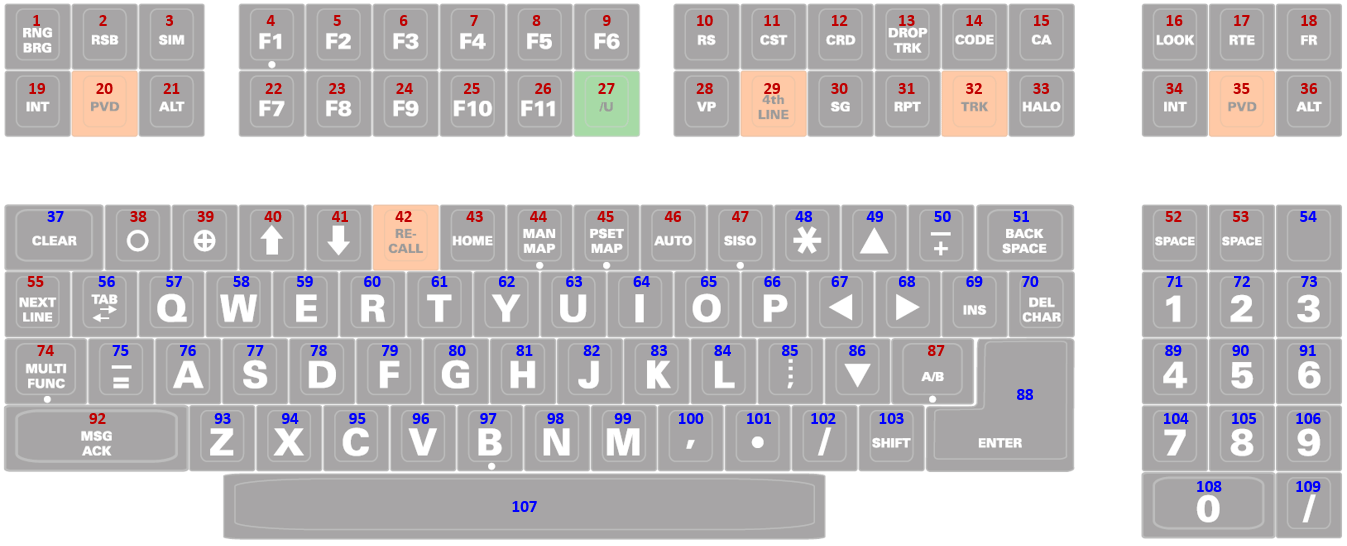
The image below shows the full keyboard layout. Each key is labeled with a number, which is referenced in the keymap tables on this page.
 ### Understanding key types
The keyboard is a composite USB device, meaning that some keys act like a standard keyboard, while others act like a joystick or gamepad-style input.
These keys behave like normal keyboard keys. You can use them anywhere on your system, including text fields, message dialogs, and within CRC.
These keys behave like joystick button inputs. CRC has been specifically programmed to recognize these inputs and map them to their intended ERAM functions.
These keys have no functionality outside of CRC.
## Keymap
For functions that reference CRC, consult CRC's [ERAM Documentation](https://docs.virtualnas.net/crc/eram/#eram-commands) for more information.
Several of the keys currently marked with `No Function` are planned to become functional in future versions of CRC.
### Row 1
| Key # | Key Text | Function |
| - | - | - |
| 1 | `RNG BRG` | `LA` command; refer to CRC documentation |
| 2 | `RSB` | No Function |
| 3 | `SIM` | No Function |
| 4 | `F1` | No Function |
| 5 | `F2` | No Function |
| 6 | `F3` | No Function |
| 7 | `F4` | No Function |
| 8 | `F5` | No Function |
| 9 | `F6` | No Function |
| 10 | `RS` | No Function |
| 11 | `CST` | No Function |
| 12 | `CRD` | `QD` command; refer to CRC documentation |
| 13 | `DROP TRK` | `QX` command; refer to CRC documentation |
| 14 | `CODE` | `QB` command; refer to CRC documentation |
| 15 | `CA` | No Function |
| 16 | `LOOK` | `QL` command; refer to CRC documentation |
| 17 | `RTE` | `QU` command; refer to CRC documentation |
| 18 | `FR` | `QF` command; refer to CRC documentation |
### Row 2
| Key # | Key Text | Function |
| - | - | - |
| 19 | `INT` | `QQ` command; refer to CRC documentation |
| 20 | `PVD` | `QP` command; refer to CRC documentation |
| 21 | `ALT` | `QZ` command; refer to CRC documentation |
| 22 | `F7` | No Function |
| 23 | `F8` | No Function |
| 24 | `F9` | No Function |
| 25 | `F10` | No Function |
| 26 | `F11` | No Function |
| 27 | `/U` | No Function |
| 28 | `VP` | `VP` command; refer to CRC documentation |
| 29 | `4th LINE` | `QS` command; refer to CRC documentation |
| 30 | `SG` | No Function |
| 31 | `RPT` | `QR` command; refer to CRC documentation |
| 32 | `TRK` | `QT` command; refer to CRC documentation |
| 33 | `HALO` | `QP J` command; refer to CRC documentation |
| 34 | `INT` | `QQ` command; refer to CRC documentation |
| 35 | `PVD` | `QP` command; refer to CRC documentation |
| 36 | `ALT` | `QZ` command; refer to CRC documentation |
### Row 3
| Key # | Key Text | Function |
| - | - | - |
| 37 | `CLEAR` | Equivalent to keyboard `ESC` key |
| 38 | `◯` | Inserts clear weather symbol |
| 39 | `⊕` | Inserts overcast weather symbol |
| 40 | `↑` | Inserts up arrow symbol |
| 41 | `↓` | Inserts down arrow symbol |
| 42 | `RE-CALL` | Recalls last-entered message |
| 43 | `HOME` | No Function |
| 44 | `MAN MAP` | No Function |
| 45 | `PSET MAP` | No Function |
| 46 | `AUTO` | No Function |
| 47 | `SISO` | Opens the connection dialog
### Understanding key types
The keyboard is a composite USB device, meaning that some keys act like a standard keyboard, while others act like a joystick or gamepad-style input.
These keys behave like normal keyboard keys. You can use them anywhere on your system, including text fields, message dialogs, and within CRC.
These keys behave like joystick button inputs. CRC has been specifically programmed to recognize these inputs and map them to their intended ERAM functions.
These keys have no functionality outside of CRC.
## Keymap
For functions that reference CRC, consult CRC's [ERAM Documentation](https://docs.virtualnas.net/crc/eram/#eram-commands) for more information.
Several of the keys currently marked with `No Function` are planned to become functional in future versions of CRC.
### Row 1
| Key # | Key Text | Function |
| - | - | - |
| 1 | `RNG BRG` | `LA` command; refer to CRC documentation |
| 2 | `RSB` | No Function |
| 3 | `SIM` | No Function |
| 4 | `F1` | No Function |
| 5 | `F2` | No Function |
| 6 | `F3` | No Function |
| 7 | `F4` | No Function |
| 8 | `F5` | No Function |
| 9 | `F6` | No Function |
| 10 | `RS` | No Function |
| 11 | `CST` | No Function |
| 12 | `CRD` | `QD` command; refer to CRC documentation |
| 13 | `DROP TRK` | `QX` command; refer to CRC documentation |
| 14 | `CODE` | `QB` command; refer to CRC documentation |
| 15 | `CA` | No Function |
| 16 | `LOOK` | `QL` command; refer to CRC documentation |
| 17 | `RTE` | `QU` command; refer to CRC documentation |
| 18 | `FR` | `QF` command; refer to CRC documentation |
### Row 2
| Key # | Key Text | Function |
| - | - | - |
| 19 | `INT` | `QQ` command; refer to CRC documentation |
| 20 | `PVD` | `QP` command; refer to CRC documentation |
| 21 | `ALT` | `QZ` command; refer to CRC documentation |
| 22 | `F7` | No Function |
| 23 | `F8` | No Function |
| 24 | `F9` | No Function |
| 25 | `F10` | No Function |
| 26 | `F11` | No Function |
| 27 | `/U` | No Function |
| 28 | `VP` | `VP` command; refer to CRC documentation |
| 29 | `4th LINE` | `QS` command; refer to CRC documentation |
| 30 | `SG` | No Function |
| 31 | `RPT` | `QR` command; refer to CRC documentation |
| 32 | `TRK` | `QT` command; refer to CRC documentation |
| 33 | `HALO` | `QP J` command; refer to CRC documentation |
| 34 | `INT` | `QQ` command; refer to CRC documentation |
| 35 | `PVD` | `QP` command; refer to CRC documentation |
| 36 | `ALT` | `QZ` command; refer to CRC documentation |
### Row 3
| Key # | Key Text | Function |
| - | - | - |
| 37 | `CLEAR` | Equivalent to keyboard `ESC` key |
| 38 | `◯` | Inserts clear weather symbol |
| 39 | `⊕` | Inserts overcast weather symbol |
| 40 | `↑` | Inserts up arrow symbol |
| 41 | `↓` | Inserts down arrow symbol |
| 42 | `RE-CALL` | Recalls last-entered message |
| 43 | `HOME` | No Function |
| 44 | `MAN MAP` | No Function |
| 45 | `PSET MAP` | No Function |
| 46 | `AUTO` | No Function |
| 47 | `SISO` | Opens the connection dialog
With `CTRL + SHIFT`, activates the controlling session |
| 48 | `✱` | Equivalent to keyboard `*` key |
| 49 | `▲` | Equivalent to keyboard `UP ARROW` key |
| 50 | `- +` | Inserts `+` character
With `SHIFT`, inserts `-` character |
| 51 | `BACK SPACE` | Equivalent to keyboard `BACKSPACE` key |
| 52 | `SPACE` | Inserts space character |
| 53 | `SPACE` | Inserts space character |
| 54 | \[Blank] | Equivalent to keyboard `CTRL` key |
### Row 4
| Key # | Key Text | Function |
| - | - | - |
| 55 | `NEXT LINE` | Moves MCA cursor to next line |
| 56 | `TAB` | Equivalent to keyboard `TAB` key |
| 57 | `Q` | Equivalent to keyboard `Q` key |
| 58 | `W` | Equivalent to keyboard `W` key |
| 59 | `E` | Equivalent to keyboard `E` key |
| 60 | `R` | Equivalent to keyboard `R` key |
| 61 | `T` | Equivalent to keyboard `T` key |
| 62 | `Y` | Equivalent to keyboard `Y` key |
| 63 | `U` | Equivalent to keyboard `U` key |
| 64 | `I` | Equivalent to keyboard `I` key |
| 65 | `O` | Equivalent to keyboard `O` key |
| 66 | `P` | Equivalent to keyboard `P` key |
| 67 | `◀` | Equivalent to keyboard `LEFT ARROW` key |
| 68 | `▶` | Equivalent to keyboard `RIGHT ARROW` key |
| 69 | `INS` | Equivalent to keyboard `INSERT` key |
| 70 | `DEL CHAR` | Equivalent to keyboard `DELETE` key |
| 71 | `1` | Equivalent to numpad `1` key |
| 72 | `2` | Equivalent to numpad `2` key |
| 73 | `3` | Equivalent to numpad `3` key |
### Row 5
| Key # | Key Text | Function |
| - | - | - |
| 74 | `MULTI FUNC` | No Function |
| 75 | `_ =` | Inserts `=` character
With `SHIFT`, inserts `_` character |
| 76 | `A` | Equivalent to keyboard `A` key |
| 77 | `S` | Equivalent to keyboard `S` key |
| 78 | `D` | Equivalent to keyboard `D` key |
| 79 | `F` | Equivalent to keyboard `F` key |
| 80 | `G` | Equivalent to keyboard `G` key |
| 81 | `H` | Equivalent to keyboard `H` key |
| 82 | `J` | Equivalent to keyboard `J` key |
| 83 | `K` | Equivalent to keyboard `K` key |
| 84 | `L` | Equivalent to keyboard `L` key |
| 85 | `: ;` | Equivalent to keyboard `: ;` key |
| 86 | `▼` | Equivalent to keyboard `DOWN ARROW` key |
| 87 | `A/B` | No Function |
| 88 | `ENTER` | Equivalent to keyboard `ENTER` key |
| 89 | `4` | Equivalent to numpad `4` key |
| 90 | `5` | Equivalent to numpad `5` key |
| 91 | `6` | Equivalent to numpad `6` key |
### Row 6
| Key # | Key Text | Function |
| - | - | - |
| 92 | `MSG ACK` | No Function |
| 93 | `Z` | Equivalent to keyboard `Z` key |
| 94 | `X` | Equivalent to keyboard `X` key |
| 95 | `C` | Equivalent to keyboard `C` key |
| 96 | `V` | Equivalent to keyboard `V` key |
| 97 | `B` | Equivalent to keyboard `B` key |
| 98 | `N` | Equivalent to keyboard `N` key |
| 99 | `M` | Equivalent to keyboard `M` key |
| 100 | `,` | Equivalent to keyboard `,` key |
| 101 | `●` | Equivalent to keyboard `.` key |
| 102 | `/` | Equivalent to keyboard `/` key |
| 103 | `SHIFT` | Equivalent to keyboard `SHIFT` key |
| 104 | `7` | Equivalent to numpad `7` key |
| 105 | `8` | Equivalent to numpad `8` key |
| 106 | `9` | Equivalent to numpad `9` key |
### Row 7
| Key # | Key Text | Function |
| - | - | - |
| 107 | \[Blank] | Equivalent to keyboard `SPACE` key |
| 108 | `0` | Equivalent to numpad `0` key |
| 109 | `/` | Equivalent to numpad `/` key |
## VATSIM shortcut keys
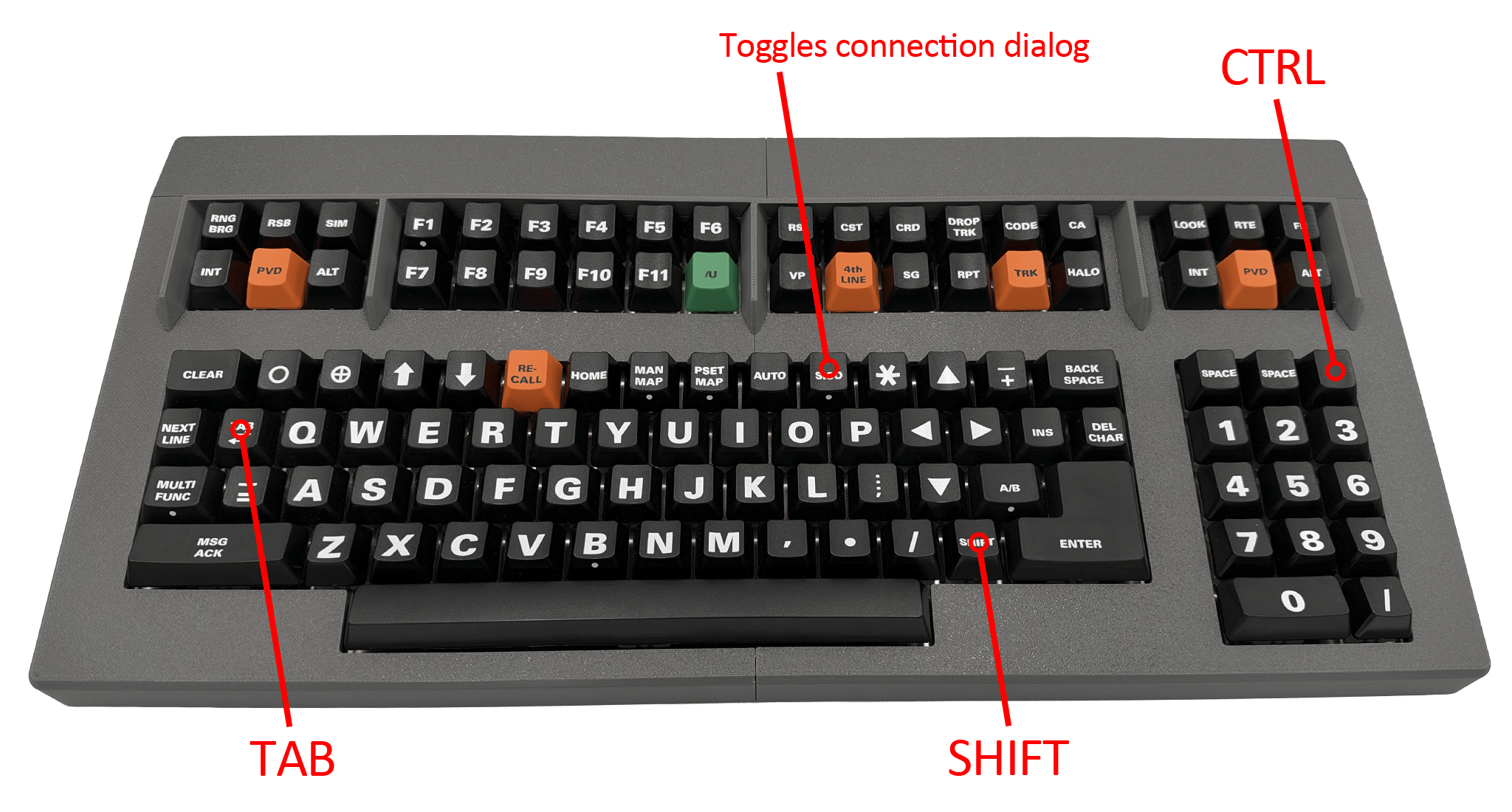
As shown in the keymap tables above and in the image below, the ERAM Keyboard includes a hidden `CTRL` / `Command ⌘` key.
This hidden key, combined with the existing `SHIFT` and `TAB` keys, enables common VATSIM and CRC shortcuts, such as direct messaging and command variations.
**Note:** The `CTRL` shortcut will automatically behave as `Control` on Windows or `Command ⌘` on macOS, depending on your operating system.
In some setups (such as those with certain USB hubs), automatic detection may not work correctly. In those cases, the key will default to behaving as a standard `Control` key.
 This documentation is built and hosted on [Mintlify](https://mintlify.com), a developer documentation platform.