> ## Documentation Index
> Fetch the complete documentation index at: https://docs.virtualcontrollersupply.com/llms.txt
> Use this file to discover all available pages before exploring further.
# Key Map & Shortcuts
> An overview of each key and its function.
## Keyboard Layout
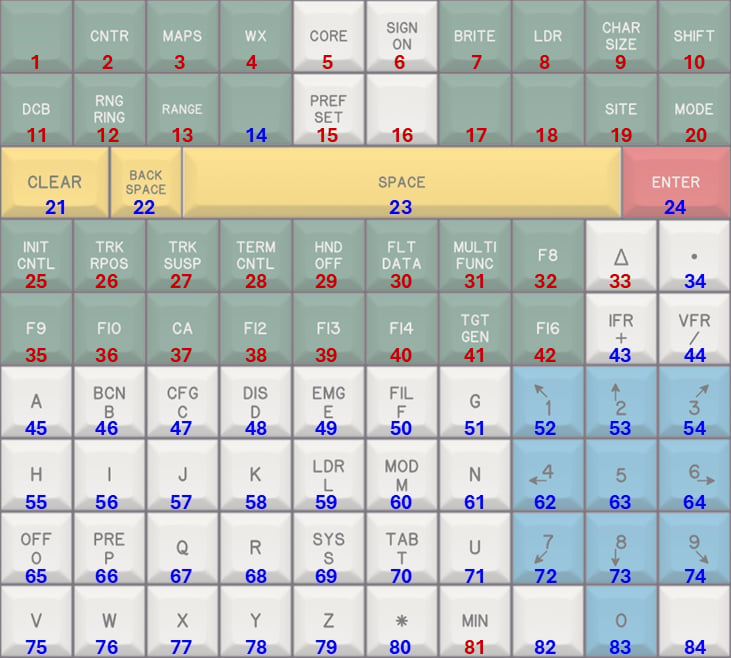
The image below shows the full keyboard layout. Each key is labeled with a number, which is referenced in the keymap tables on this page.
 ### Understanding Key Types
The keyboard is a composite USB device, meaning that some keys act like a standard keyboard, while others act like a joystick or gamepad-style input.
These keys behave like normal keyboard keys. You can use them anywhere on your system, including text fields, message dialogs, and within CRC.
These keys behave like joystick button inputs. CRC has been specifically programmed to recognize these inputs and map them to their intended STARS functions.
These keys have no functionality outside of CRC.
## Keymap
For fuctions that reference CRC, consult the 'STARS Keys' section of CRC's [STARS Documentation](https://crc.virtualnas.net/docs/#/stars) for more information.
### Row 1
| Key # | Key Text | Function |
| ----- | ----------- | -------------------------------------------------------------------------- |
| 1 | \[Blank] | Beacon code readout or "beaconator" key, as discussed in CRC documentation |
| 2 | `CNTR` | Refer to CRC documentation |
| 3 | `MAPS` | Refer to CRC documentation |
| 4 | `WX` | Refer to CRC documentation |
| 5 | `CORE` | Refer to CRC documentation |
| 6 | `SIGN ON` | Opens the connection dialog |
| 7 | `BRITE` | Refer to CRC documentation |
| 8 | `LDR` | Refer to CRC documentation |
| 9 | `CHAR SIZE` | Refer to CRC documentation |
| 10 | `SHIFT` | Refer to CRC documentation |
### Row 2
| Key # | Key Text | Function |
| ----- | ---------- | -------------------------------------------------------------- |
| 11 | `DCB` | Refer to CRC documentation |
| 12 | `RNG RING` | Refer to CRC documentation |
| 13 | `RANGE` | Refer to CRC documentation |
| 14 | \[Blank] | Equivalent to keyboard `TAB` key |
| 15 | `PREF SET` | Refer to CRC documentation |
| 16 | \[Blank] | Activates the controlling session; use after the `SIGN ON` key |
| 17 | \[Blank] | No Function |
| 18 | \[Blank] | No Function |
| 19 | `SITE` | Refer to CRC documentation |
| 20 | `MODE` | Refer to CRC documentation |
### Row 3
| Key # | Key Text | Function |
| ----- | ------------ | --------------------------------------- |
| 21 | `CLEAR` | Equivalent to keyboard `ESC` key. |
| 22 | `BACK SPACE` | Equivalent to keyboard `BACKSPACE` key. |
| 23 | `SPACE` | Equivalent to keyboard `SPACE` key. |
| 24 | `ENTER` | Equivalent to keyboard `ENTER` key. |
### Row 4
| Key # | Key Text | Function |
| ----- | ------------ | ------------------------------- |
| 25 | `INIT CNTL` | Refer to CRC documentation |
| 26 | `TRK RPOS` | Refer to CRC documentation |
| 27 | `TRK SUSP` | Refer to CRC documentation |
| 28 | `TERM CNTL` | Refer to CRC documentation |
| 29 | `HND OFF` | Refer to CRC documentation |
| 30 | `FLT DATA` | Refer to CRC documentation |
| 31 | `MULTI FUNC` | Refer to CRC documentation |
| 32 | `F8` | Refer to CRC documentation |
| 33 | `Δ` | Refer to CRC documentation |
| 34 | `.` | Equivalent to keyboard `.` key. |
### Row 5
| Key # | Key Text | Function |
| ----- | ---------- | ------------------------------- |
| 35 | `F9` | Refer to CRC documentation |
| 36 | `F10` | Refer to CRC documentation |
| 37 | `CA` | Refer to CRC documentation |
| 38 | `F12` | Refer to CRC documentation |
| 39 | `F13` | Refer to CRC documentation |
| 40 | `F14` | Refer to CRC documentation |
| 41 | `TGT GEN` | Refer to CRC documentation |
| 42 | `F16` | Refer to CRC documentation |
| 43 | `IFR +` | Equivalent to keyboard `+` key. |
| 44 | `VFR /` | Equivalent to keyboard `/` key. |
### Row 6
| Key # | Key Text | Function |
| ----- | -------- | ------------------------------- |
| 45 | `A` | Equivalent to keyboard `A` key. |
| 46 | `BCN B` | Equivalent to keyboard `B` key. |
| 47 | `CFG C` | Equivalent to keyboard `C` key. |
| 48 | `DIS D` | Equivalent to keyboard `D` key. |
| 49 | `EMG E` | Equivalent to keyboard `E` key. |
| 50 | `FIL F` | Equivalent to keyboard `F` key. |
| 51 | `G` | Equivalent to keyboard `G` key. |
| 52 | `↖ 1` | Equivalent to numpad `1` key. |
| 53 | `↑ 2` | Equivalent to numpad `2` key. |
| 54 | `3 ↗` | Equivalent to numpad `3` key. |
### Row 7
| Key # | Key Text | Function |
| ----- | -------- | ------------------------------- |
| 55 | `H` | Equivalent to keyboard `H` key. |
| 56 | `I` | Equivalent to keyboard `I` key. |
| 57 | `J` | Equivalent to keyboard `J` key. |
| 58 | `K` | Equivalent to keyboard `K` key. |
| 59 | `LDR L` | Equivalent to keyboard `L` key. |
| 60 | `MOD M` | Equivalent to keyboard `M` key. |
| 61 | `N` | Equivalent to keyboard `N` key. |
| 62 | `← 4` | Equivalent to numpad `4` key. |
| 63 | `5` | Equivalent to numpad `5` key. |
| 64 | `6 →` | Equivalent to numpad `6` key. |
### Row 8
| Key # | Key Text | Function |
| ----- | -------- | ------------------------------- |
| 65 | `OFF O` | Equivalent to keyboard `O` key. |
| 66 | `PRE P` | Equivalent to keyboard `P` key. |
| 67 | `Q` | Equivalent to keyboard `Q` key. |
| 68 | `R` | Equivalent to keyboard `R` key. |
| 69 | `SYS S` | Equivalent to keyboard `S` key. |
| 70 | `TAB T` | Equivalent to keyboard `T` key. |
| 71 | `U` | Equivalent to keyboard `U` key. |
| 72 | `↙ 7` | Equivalent to numpad `7` key. |
| 73 | `↓ 8` | Equivalent to numpad `8` key. |
| 74 | `9 ↘` | Equivalent to numpad `9` key. |
### Row 9
| Key # | Key Text | Function |
| ----- | -------- | ----------------------------------- |
| 75 | `V` | Equivalent to keyboard `V` key. |
| 76 | `W` | Equivalent to keyboard `W` key. |
| 77 | `X` | Equivalent to keyboard `X` key. |
| 78 | `Y` | Equivalent to keyboard `Y` key. |
| 79 | `Z` | Equivalent to keyboard `Z` key. |
| 80 | `✱` | Equivalent to keyboard `*` key. |
| 81 | `MIN` | Refer to CRC documentation |
| 82 | \[BLANK] | Equivalent to keyboard `SHIFT` key. |
| 83 | `0` | Equivalent to numpad `0` key. |
| 84 | \[BLANK] | Equivalent to keyboard `CTRL` key. |
## VATSIM Shortcut Keys
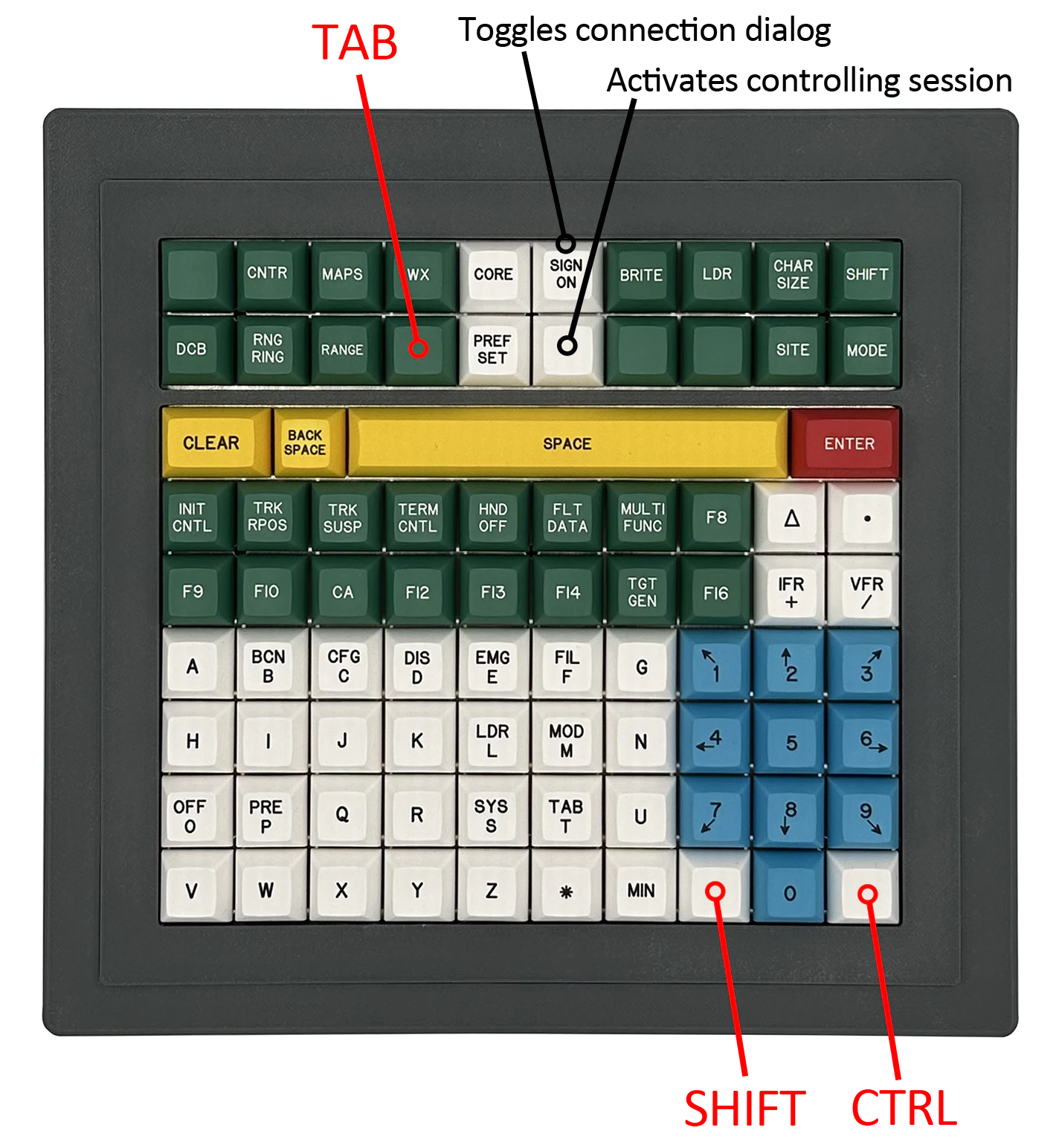
As shown in the keymap tables above and in the image below, the STARS Keyboard includes hidden `SHIFT`, `CTRL` / `Command ⌘`, and `TAB` keys.
These keys are provided to support common VATSIM and CRC shortcuts, such as direct messaging and command variations.
**Note:** The `CTRL` shortcut will automatically behave as `Control` on Windows or `Command ⌘` on macOS, depending on your operating system.
In some setups (such as those with certain USB hubs), automatic detection may not work correctly. In those cases, the key will default to behaving as a standard `Control` key.
### Understanding Key Types
The keyboard is a composite USB device, meaning that some keys act like a standard keyboard, while others act like a joystick or gamepad-style input.
These keys behave like normal keyboard keys. You can use them anywhere on your system, including text fields, message dialogs, and within CRC.
These keys behave like joystick button inputs. CRC has been specifically programmed to recognize these inputs and map them to their intended STARS functions.
These keys have no functionality outside of CRC.
## Keymap
For fuctions that reference CRC, consult the 'STARS Keys' section of CRC's [STARS Documentation](https://crc.virtualnas.net/docs/#/stars) for more information.
### Row 1
| Key # | Key Text | Function |
| ----- | ----------- | -------------------------------------------------------------------------- |
| 1 | \[Blank] | Beacon code readout or "beaconator" key, as discussed in CRC documentation |
| 2 | `CNTR` | Refer to CRC documentation |
| 3 | `MAPS` | Refer to CRC documentation |
| 4 | `WX` | Refer to CRC documentation |
| 5 | `CORE` | Refer to CRC documentation |
| 6 | `SIGN ON` | Opens the connection dialog |
| 7 | `BRITE` | Refer to CRC documentation |
| 8 | `LDR` | Refer to CRC documentation |
| 9 | `CHAR SIZE` | Refer to CRC documentation |
| 10 | `SHIFT` | Refer to CRC documentation |
### Row 2
| Key # | Key Text | Function |
| ----- | ---------- | -------------------------------------------------------------- |
| 11 | `DCB` | Refer to CRC documentation |
| 12 | `RNG RING` | Refer to CRC documentation |
| 13 | `RANGE` | Refer to CRC documentation |
| 14 | \[Blank] | Equivalent to keyboard `TAB` key |
| 15 | `PREF SET` | Refer to CRC documentation |
| 16 | \[Blank] | Activates the controlling session; use after the `SIGN ON` key |
| 17 | \[Blank] | No Function |
| 18 | \[Blank] | No Function |
| 19 | `SITE` | Refer to CRC documentation |
| 20 | `MODE` | Refer to CRC documentation |
### Row 3
| Key # | Key Text | Function |
| ----- | ------------ | --------------------------------------- |
| 21 | `CLEAR` | Equivalent to keyboard `ESC` key. |
| 22 | `BACK SPACE` | Equivalent to keyboard `BACKSPACE` key. |
| 23 | `SPACE` | Equivalent to keyboard `SPACE` key. |
| 24 | `ENTER` | Equivalent to keyboard `ENTER` key. |
### Row 4
| Key # | Key Text | Function |
| ----- | ------------ | ------------------------------- |
| 25 | `INIT CNTL` | Refer to CRC documentation |
| 26 | `TRK RPOS` | Refer to CRC documentation |
| 27 | `TRK SUSP` | Refer to CRC documentation |
| 28 | `TERM CNTL` | Refer to CRC documentation |
| 29 | `HND OFF` | Refer to CRC documentation |
| 30 | `FLT DATA` | Refer to CRC documentation |
| 31 | `MULTI FUNC` | Refer to CRC documentation |
| 32 | `F8` | Refer to CRC documentation |
| 33 | `Δ` | Refer to CRC documentation |
| 34 | `.` | Equivalent to keyboard `.` key. |
### Row 5
| Key # | Key Text | Function |
| ----- | ---------- | ------------------------------- |
| 35 | `F9` | Refer to CRC documentation |
| 36 | `F10` | Refer to CRC documentation |
| 37 | `CA` | Refer to CRC documentation |
| 38 | `F12` | Refer to CRC documentation |
| 39 | `F13` | Refer to CRC documentation |
| 40 | `F14` | Refer to CRC documentation |
| 41 | `TGT GEN` | Refer to CRC documentation |
| 42 | `F16` | Refer to CRC documentation |
| 43 | `IFR +` | Equivalent to keyboard `+` key. |
| 44 | `VFR /` | Equivalent to keyboard `/` key. |
### Row 6
| Key # | Key Text | Function |
| ----- | -------- | ------------------------------- |
| 45 | `A` | Equivalent to keyboard `A` key. |
| 46 | `BCN B` | Equivalent to keyboard `B` key. |
| 47 | `CFG C` | Equivalent to keyboard `C` key. |
| 48 | `DIS D` | Equivalent to keyboard `D` key. |
| 49 | `EMG E` | Equivalent to keyboard `E` key. |
| 50 | `FIL F` | Equivalent to keyboard `F` key. |
| 51 | `G` | Equivalent to keyboard `G` key. |
| 52 | `↖ 1` | Equivalent to numpad `1` key. |
| 53 | `↑ 2` | Equivalent to numpad `2` key. |
| 54 | `3 ↗` | Equivalent to numpad `3` key. |
### Row 7
| Key # | Key Text | Function |
| ----- | -------- | ------------------------------- |
| 55 | `H` | Equivalent to keyboard `H` key. |
| 56 | `I` | Equivalent to keyboard `I` key. |
| 57 | `J` | Equivalent to keyboard `J` key. |
| 58 | `K` | Equivalent to keyboard `K` key. |
| 59 | `LDR L` | Equivalent to keyboard `L` key. |
| 60 | `MOD M` | Equivalent to keyboard `M` key. |
| 61 | `N` | Equivalent to keyboard `N` key. |
| 62 | `← 4` | Equivalent to numpad `4` key. |
| 63 | `5` | Equivalent to numpad `5` key. |
| 64 | `6 →` | Equivalent to numpad `6` key. |
### Row 8
| Key # | Key Text | Function |
| ----- | -------- | ------------------------------- |
| 65 | `OFF O` | Equivalent to keyboard `O` key. |
| 66 | `PRE P` | Equivalent to keyboard `P` key. |
| 67 | `Q` | Equivalent to keyboard `Q` key. |
| 68 | `R` | Equivalent to keyboard `R` key. |
| 69 | `SYS S` | Equivalent to keyboard `S` key. |
| 70 | `TAB T` | Equivalent to keyboard `T` key. |
| 71 | `U` | Equivalent to keyboard `U` key. |
| 72 | `↙ 7` | Equivalent to numpad `7` key. |
| 73 | `↓ 8` | Equivalent to numpad `8` key. |
| 74 | `9 ↘` | Equivalent to numpad `9` key. |
### Row 9
| Key # | Key Text | Function |
| ----- | -------- | ----------------------------------- |
| 75 | `V` | Equivalent to keyboard `V` key. |
| 76 | `W` | Equivalent to keyboard `W` key. |
| 77 | `X` | Equivalent to keyboard `X` key. |
| 78 | `Y` | Equivalent to keyboard `Y` key. |
| 79 | `Z` | Equivalent to keyboard `Z` key. |
| 80 | `✱` | Equivalent to keyboard `*` key. |
| 81 | `MIN` | Refer to CRC documentation |
| 82 | \[BLANK] | Equivalent to keyboard `SHIFT` key. |
| 83 | `0` | Equivalent to numpad `0` key. |
| 84 | \[BLANK] | Equivalent to keyboard `CTRL` key. |
## VATSIM Shortcut Keys
As shown in the keymap tables above and in the image below, the STARS Keyboard includes hidden `SHIFT`, `CTRL` / `Command ⌘`, and `TAB` keys.
These keys are provided to support common VATSIM and CRC shortcuts, such as direct messaging and command variations.
**Note:** The `CTRL` shortcut will automatically behave as `Control` on Windows or `Command ⌘` on macOS, depending on your operating system.
In some setups (such as those with certain USB hubs), automatic detection may not work correctly. In those cases, the key will default to behaving as a standard `Control` key.