
Keyboard Layout

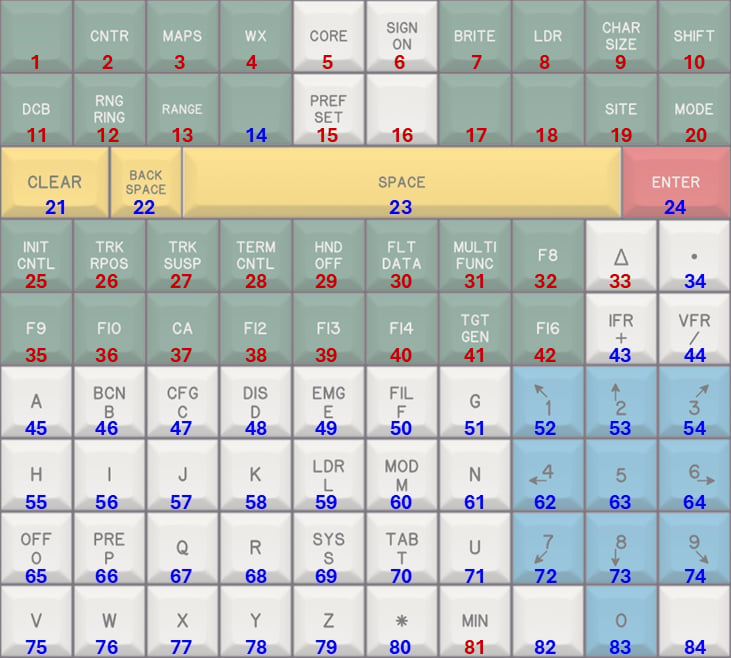
The image below shows the full keyboard layout. Each key is labeled with a number, which is referenced in the keymap tables further down this page. STARS Keyboard Layout

Understanding Key Types

The keyboard is a composite USB device, meaning that some keys act like a standard keyboard, while others act like a joystick or gamepad-style input.

🔵 Blue Numbered Keys

These keys behave like normal keyboard keys. You can use them anywhere on your system, including text fields, message dialogs, and within CRC.

🔴 Red Numbered Keys

These keys behave like joystick button inputs. CRC has been specifically programmed to recognize these inputs and map them to their intended STARS functions.These keys have no functionality outside of CRC.

Keymap

Row 1

Key #Key TextFunctionNotes
1[Blank]No Function
2CNTRRe-centers the radar scope.
3MAPSIf DCB is visible, opens the DCB MAPS submenu.
4WX???
5CORE???
6SIGN ONOpens the connection dialog.
7BRITEIf DCB is visible, opens the DCB BRITE submenu.
8LDRIf DCB is visible, initiates the DCB LDR function.
9CHAR SIZEIf DCB is visible, opens the DCB CHAR SIZE submenu.
10SHIFTIf DCB is visible, toggles between the main and aux DCB menus.

Row 2

Key #Key TextFunctionNotes
11DCBToggles display of the DCB.
12RNG RINGIf DCB is visible, initiates the DCB RR function.
13RANGEIf DCB is visible, initiates the DCB RANGE function.
14[Blank]Equivalent to keyboard TAB key.Used for VATSIM shortcuts.
15PREF SETIf DCB is visible, initiates the DCB PREF function.
16[Blank]Activates the controlling session.
17[Blank]No Function
18[Blank]No Function
19SITENo Function
20MODENo Function

Row 3

Key #Key TextFunctionNotes
21CLEAREquivalent to keyboard ESC key.
22BACK SPACEEquivalent to keyboard BACKSPACE key.
23SPACEEquivalent to keyboard SPACE key.
24ENTEREquivalent to keyboard ENTER key.

Row 4

Key #Key TextFunctionNotes
25INIT CNTL???
26TRK RPOS???
27TRK SUSP???
28TERM CNTL???
29HND OFF???
30FLT DATA???
31MULTI FUNC???
32F8???
33Δ??
34.Equivalent to keyboard . key.

Row 5

Key #Key TextFunctionNotes
35F9???
36F10???
37CA???
38F12???
39F13???
40F14???
41TGT GEN???
42F16???
43IFR +Equivalent to keyboard + key.
44VFR /Equivalent to keyboard / key.

Row 6

Key #Key TextFunctionNotes
45AEquivalent to keyboard A key.
46BCN BEquivalent to keyboard B key.
47CFG CEquivalent to keyboard C key.
48DIS DEquivalent to keyboard D key.
49EMG EEquivalent to keyboard E key.
50FIL FEquivalent to keyboard F key.
51GEquivalent to keyboard G key.
52↖ 1Equivalent to numpad 1 key.
53↑ 2Equivalent to numpad 2 key.
543 ↗Equivalent to numpad 3 key.

Row 7

Key #Key TextFunctionNotes
55HEquivalent to keyboard H key.
56IEquivalent to keyboard I key.
57JEquivalent to keyboard J key.
58KEquivalent to keyboard K key.
59LDR LEquivalent to keyboard L key.
60MOD MEquivalent to keyboard M key.
61NEquivalent to keyboard N key.
62← 4Equivalent to numpad 4 key.
635Equivalent to numpad 5 key.
646 →Equivalent to numpad 6 key.

Row 8

Key #Key TextFunctionNotes
65OFF OEquivalent to keyboard O key.
66PRE PEquivalent to keyboard P key.
67QEquivalent to keyboard Q key.
68REquivalent to keyboard R key.
69SYS SEquivalent to keyboard S key.
70TAB TEquivalent to keyboard T key.
71UEquivalent to keyboard U key.
72↙ 7Equivalent to numpad 7 key.
73↓ 8Equivalent to numpad 8 key.
749 ↘Equivalent to numpad 9 key.

Row 9

Key #Key TextFunctionNotes
75VEquivalent to keyboard V key.
76WEquivalent to keyboard W key.
77XEquivalent to keyboard X key.
78YEquivalent to keyboard Y key.
79ZEquivalent to keyboard Z key.
80Equivalent to keyboard * key.
81MINEquivalent to keyboard U key.
82[BLANK]Equivalent to keyboard SHIFT key.Used for VATSIM shortcuts.
830Equivalent to numpad 0 key.
84[BLANK]Equivalent to keyboard CTRL key.Used for VATSIM shortcuts.

Hidden Shortcut Keys

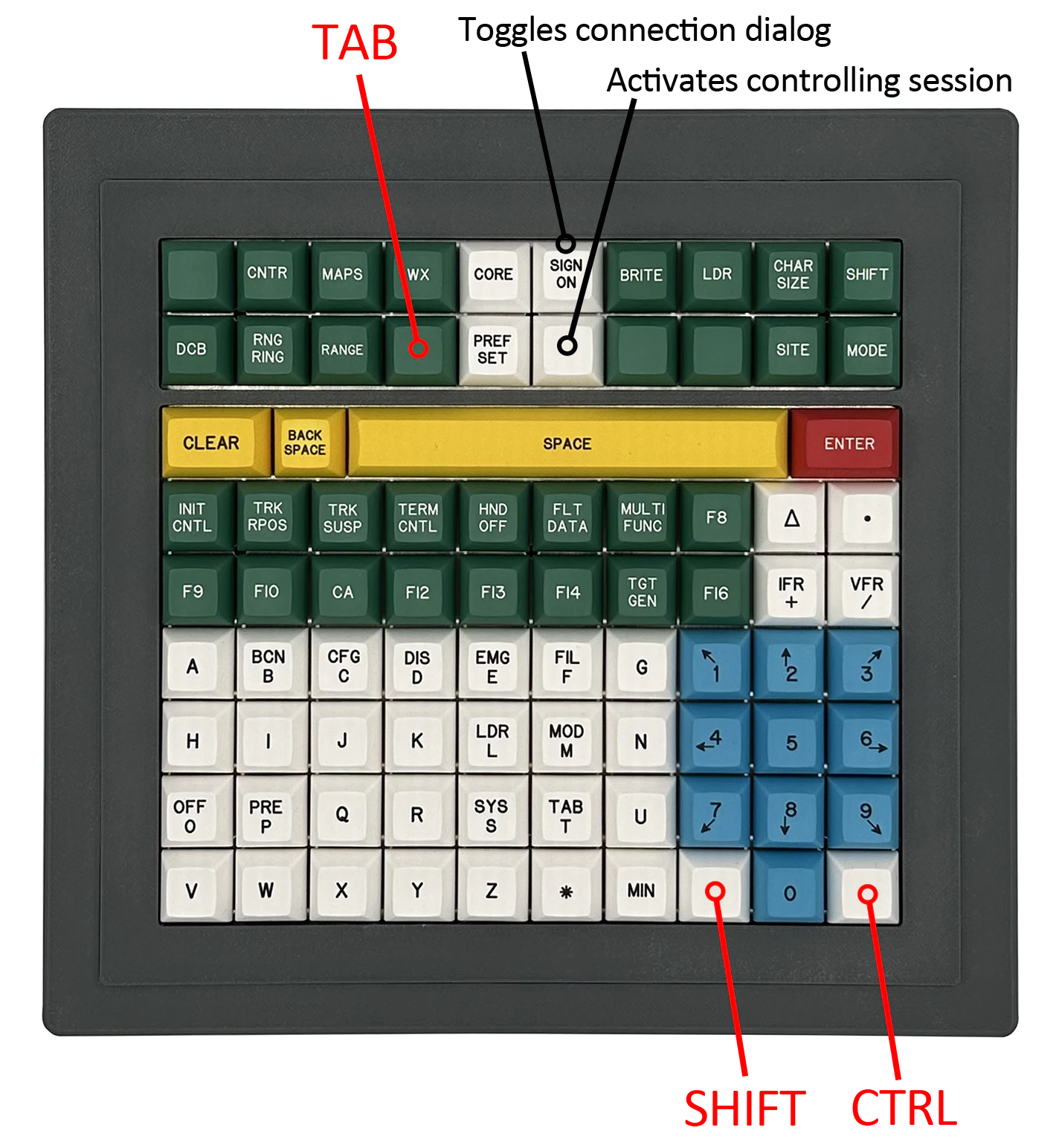
As shown in the keymap tables above and in the image below, the STARS Keyboard includes hidden SHIFT, CTRL, and TAB keys. These keys are provided to support common VATSIM and CRC shortcuts, such as direct messaging and command variations.
Note: The CTRL shorcut behaves as a standard Control key, even on macOS. It does not act as the Command ⌘ key.
STARS Keyboard Layout